
Anúncios
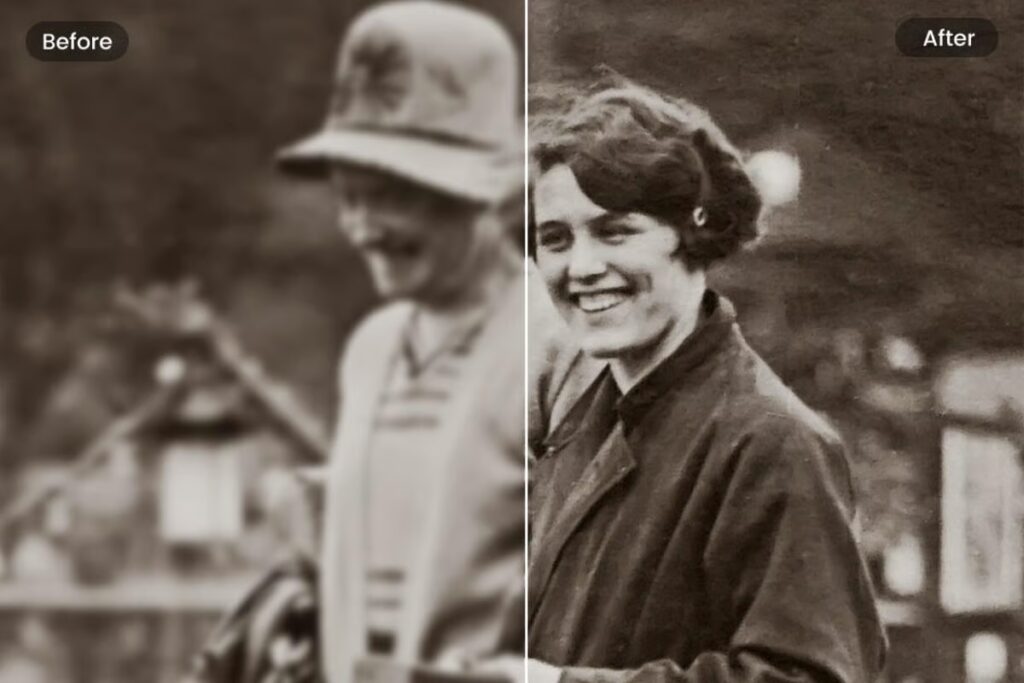
Old family photographs fade, crack, and yellow over time, but a photo restoration app can bring those memories back to life in seconds. ✨
Grandparents’ wedding pictures, childhood snapshots, and faded portraits often sit forgotten in shoeboxes. Technology now offers a practical way to rescue them.
Instead of paying a professional studio hundreds of dollars, anyone with a smartphone can scan, repair, and colorize damaged images in just a few taps.
Why Old Photos Deteriorate in the First Place#
Paper-based prints degrade because of chemical reactions, humidity, and light exposure. Silver halide particles in traditional film oxidize over decades, which causes that classic yellowish tint.


Physical damage adds another layer of trouble. Folds, scratches, water stains, and torn corners are common in photos stored without protective sleeves.
- Light exposure: UV rays break down pigments, causing fading.
- Humidity: Moisture encourages mold growth and emulsion peeling.
- Poor storage: Stacking photos without separation leads to sticking and tearing.
- Chemical instability: Older film stock wasn’t designed to last a century.
Understanding these causes helps explain why digital restoration tools have become so valuable — they fix problems that physical conservation alone can’t reverse.
How a Photo Restoration App Actually Works#
Modern restoration apps rely on machine learning models trained on millions of image pairs — damaged versus repaired. The algorithm learns patterns: how a scratch typically looks, how skin tones should appear, how edges blur when torn.
When you upload a photo, the app analyzes pixel data, identifies anomalies, and reconstructs missing or corrupted areas using predictive modeling, not simple filters.
Core Technical Steps#
- Image scanning: The app captures or imports the photo at the highest resolution possible.
- Noise reduction: Grain, dust, and compression artifacts get smoothed without losing detail.
- Damage detection: AI maps cracks, tears, and discoloration zones.
- Inpainting: Missing sections are reconstructed based on surrounding pixel context.
- Colorization (optional): Black-and-white photos get realistic color mapping based on object recognition.
This process typically takes under 30 seconds on a mid-range smartphone, which is remarkable compared to the hours a manual retoucher would need in Photoshop.
Comparing Manual Editing vs. AI-Powered Restoration#
Before AI tools became mainstream, fixing an old photo required advanced Photoshop skills, a graphics tablet, and patience measured in hours, not minutes.
| Factor | Manual Editing (Photoshop) | AI Photo Restoration App |
|---|---|---|
| Time required | 2–8 hours per photo | 10–60 seconds |
| Skill level needed | Advanced retouching knowledge | None — fully automated |
| Cost per photo | $20–$150 (professional service) | Free or low-cost subscription |
| Colorization accuracy | Depends on artist’s judgment | Trained on real-world color datasets |
| Scalability | One photo at a time | Batch processing available |
For a single treasured portrait, hiring a specialist still makes sense. But for restoring dozens or hundreds of family photos, an app is simply the only realistic option.
Key Features to Look for in a Restoration App#
Not every app delivers the same quality. Some produce overly smooth, plastic-looking faces, while others preserve natural texture and detail.
Face Enhancement Algorithms#
Look for apps that specifically detect facial features and reconstruct eyes, noses, and mouths with precision. Generic sharpening filters often distort faces instead of improving them.
Scratch and Crack Removal#
The best tools distinguish between actual damage and intentional photo elements like shadows or hair strands, avoiding unnecessary alterations.
Colorization Realism#
Quality colorization recognizes context — skin tones, fabric types, outdoor versus indoor lighting — rather than applying flat, uniform color washes.
- ✅ High-resolution export options (at least 2048px)
- ✅ Before-and-after comparison slider
- ✅ Batch upload for multiple photos
- ✅ Offline processing for privacy-conscious users
- ✅ Manual touch-up tools alongside automatic repair
Step-by-Step: Restoring Your First Photo#
Getting started takes less effort than most people expect. Here’s a practical walkthrough.
- Digitize the photo. Use your phone’s camera or a flatbed scanner at 300 DPI minimum.
- Crop and straighten. Remove background clutter so the AI focuses only on the photograph itself.
- Apply automatic restoration. Let the algorithm handle scratches, noise, and tears first.
- Review the result. Zoom in on faces and edges to check for artifacts.
- Fine-tune manually. Adjust brightness, contrast, or specific blemishes the AI missed.
- Export in high resolution. Save a master copy before sharing compressed versions online.
Keeping the original scan untouched is smart practice — you can always reprocess it later as apps improve their models.

FixMyPics - Restore Old Photos
Installs1M+
Size16MB
PlatformAndroid/iOS
PriceFree
Information about size, installs, and rating may change as the app is updated in the official stores.
Common Mistakes People Make When Restoring Old Photos#
Even with powerful tools, results vary depending on how users prepare and process their images.
Scanning at Low Resolution#
A blurry scan gives the algorithm less data to work with. Always scan at 300 DPI or higher, especially for photos smaller than 4×6 inches.
Over-Processing Colorization#
Running an image through multiple colorization passes can create unnatural, oversaturated skin tones. One clean pass usually produces better results than three aggressive ones.
Ignoring Physical Cleaning First#
Dust and fingerprints on the original photo translate into noise on the scan. A soft microfiber cloth before scanning saves the AI unnecessary work.
Privacy Considerations When Uploading Family Photos#
Many restoration apps process images on remote servers, which raises legitimate questions about data storage and usage rights.
Before uploading sensitive family archives, check the app’s privacy policy for three specifics:
- Data retention period: Are photos deleted after processing, or stored indefinitely?
- Third-party sharing: Does the company use your images to train future AI models?
- Offline mode availability: Some apps process everything locally on-device, avoiding upload entirely.
Reputable apps clearly disclose these policies in plain language, not buried in dense legal text.
Real-World Impact: Why This Technology Matters#
Beyond nostalgia, photo restoration has genuine documentary value. Historians use these tools to recover archival images damaged by floods, fires, or decades of poor storage conditions.
Museums and local history projects have digitized thousands of community photographs, using AI restoration to make fragile originals viewable without further handling.
On a personal level, families separated by war, migration, or simple distance often rely on a single surviving photo of a relative. Restoring that image sharpens details that memory alone can’t preserve — a specific smile, a particular piece of jewelry, the exact pattern on a dress.
A Quick Case Example#
A water-damaged 1952 wedding photo with a torn right corner and heavy yellowing was processed through an AI restoration app. Within 40 seconds, the tear was reconstructed using symmetry from the opposite side of the image, the yellow cast was neutralized, and facial details were sharpened enough to identify individual eyelashes. A manual retoucher quoted three hours of work for the same result.
Choosing Between Free and Paid Restoration Apps#
Free versions typically limit resolution, watermark exports, or cap the number of monthly photos. Paid tiers remove these restrictions and often add batch processing.
| Plan Type | Typical Limitations | Best For |
|---|---|---|
| Free | Watermarks, low-res export, 3–5 photos/month | Testing the app before committing |
| Monthly subscription | Usually $4–$10/month | Ongoing family archive projects |
| One-time purchase | Single payment, lifetime access | Users with a fixed photo collection to restore |
If you’re digitizing a large family archive, calculate the cost-per-photo across plans before choosing — subscriptions often work out cheaper for bulk projects.
Bringing Decades-Old Memories Back Into Focus#
Photo restoration apps turned a specialized, expensive craft into something accessible from any phone. What once required darkroom chemistry or advanced software skills now happens through guided automation.
The real value isn’t just sharper pixels — it’s reconnecting with faces and moments that time had nearly erased. A grandmother’s smile, a father’s first car, a childhood home long since demolished: all recoverable with a few taps.
Start with one photo, check the results carefully, and build from there. Your family archive deserves more than a shoebox in the closet. 📸

Keep reading
You might also like

Best Horror Movie Apps to Stream Scary Films Today
Horror movie apps have changed how fans discover, stream, and track scary films, putting decades of chilling content into a single pocket-sized…

Comic Book App: Read and Create Digital Comics
Turning everyday moments into comic panels is easier than ever, and a dedicated comic maker app puts that power right in your…