Anúncios
The Google TV app has reshaped how millions of people stream, organize, and discover entertainment across devices, all from a single interface. 📺
Unlike older streaming guides that simply listed titles, the Google TV app actively learns your habits. It pulls data from your watch history, subscriptions, and even your Google Photos to build a personalized home screen.
Whether you’re running it on a phone, a smart TV, or a Chromecast with Google TV stick, the app works as a central hub rather than just another streaming service competing for your attention.
What Makes Google TV Different from a Regular Streaming App#
Most people confuse Google TV with YouTube TV or Google Play Movies, but they serve different purposes. Google TV is an aggregator, not a content producer or cable replacement.

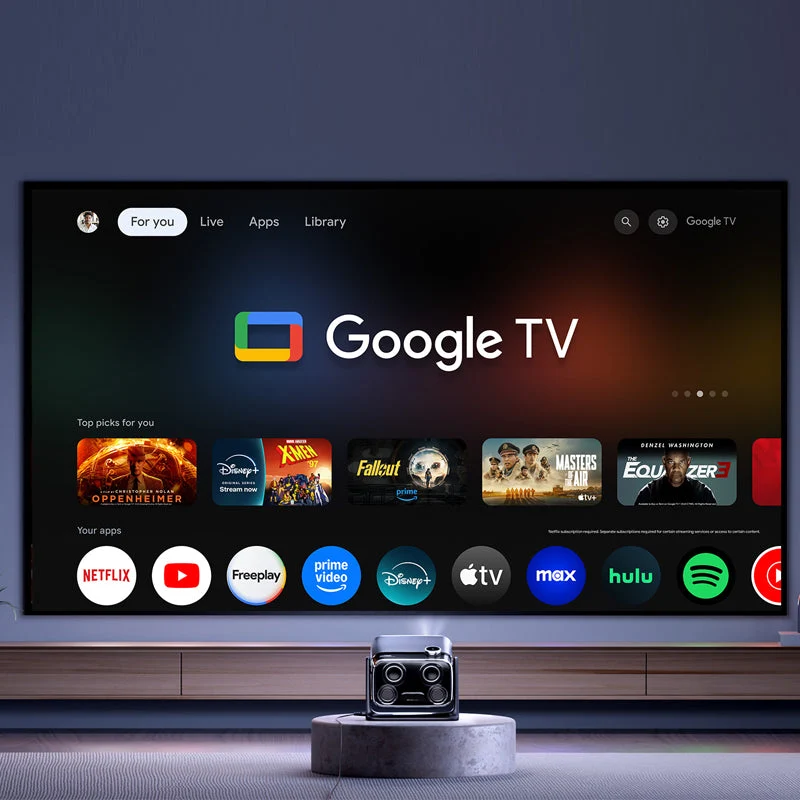
It connects to over 20 streaming services, including Netflix, Disney+, Max, Prime Video, and Apple TV+, pulling their catalogs into one searchable library. You still pay for each subscription separately — Google TV doesn’t bundle or replace them.
- Universal search: type a movie title once and see every platform where it’s available
- Watchlist syncing: add a title on your phone, find it waiting on your TV
- Live TV integration: pulls in free ad-supported channels alongside paid content
- Profile-based recommendations: each family member gets a tailored home screen
This structure means the app’s real value comes from reducing the time spent jumping between five or six different apps just to find something to watch.
How the Recommendation Engine Actually Works#
Google TV’s algorithm weighs three main signals: your viewing history, your search queries, and the ratings you give titles with a thumbs up or down. It also factors in trending content across your region.
Users who rate at least 15-20 titles tend to see noticeably sharper recommendations within a few weeks, according to patterns reported by frequent streamers. The system isn’t instant — it needs behavioral data to calibrate.
Setting Up the Google TV App Step by Step#
Getting started takes less than ten minutes on most devices. Here’s the practical breakdown:
- Download the app from the Play Store or App Store, or find it pre-installed on Chromecast and compatible smart TVs
- Sign in with your Google account — the same one tied to Gmail or Android works fine
- Link your streaming subscriptions through the settings menu so content shows up unified
- Create separate profiles for household members to avoid mixed recommendations
- Enable notifications for new episodes of shows you’re tracking
One detail people overlook: you need to manually authorize each streaming app individually. Google TV doesn’t automatically detect that you have a Netflix account just because it’s installed on your phone.
Common Setup Issues and Quick Fixes#
| Problem | Likely Cause | Fix |
|---|---|---|
| Content shows as unavailable | App not linked to your account | Go to Settings → Linked Accounts and reconnect |
| Recommendations feel random | New profile with no history | Rate 10+ titles to train the algorithm |
| App crashes on launch | Outdated version | Force update through the Play Store |
| Live channels missing | Region restrictions | Check availability for your country in settings |
Google TV on Different Devices: What Changes#
The experience isn’t identical everywhere. On a Chromecast with Google TV, you get the full interface with voice search via remote. On a smart TV with Google TV built in (like certain Sony, TCL, or Hisense models), performance depends heavily on the TV’s processor.
Mobile users get a slightly stripped-down version focused on browsing and casting rather than full playback, though you can stream directly on the phone too.
- Smart TVs: best for full-screen browsing and voice remote integration
- Chromecast dongles: most affordable way to get the full experience on older TVs
- Mobile app: ideal for building watchlists and casting content to a bigger screen
- Tablets: good middle ground for direct viewing without casting
Buyers often don’t realize that cheaper Chromecast models (the HD version) lack 4K support, which matters if your TV and subscriptions support higher resolution streaming.
Voice Search and the Google Assistant Connection#
One underrated feature is how deeply Google Assistant integrates into the search bar. You can say things like “find comedies from the 90s with high ratings” and get a filtered list, not just a single title match.
This works because Google TV cross-references its own metadata database rather than relying purely on exact title matches, which is a meaningful difference from Apple TV’s more literal search function.

Google TV
Installs10B+
Size73.9MB
PlatformAndroid/iOS
PriceFree
Information about size, installs, and rating may change as the app is updated in the official stores.
Free Content Inside Google TV: What’s Actually Available#
A frequently missed feature is the built-in free tab, which hosts ad-supported movies and live channels at no cost. This includes partnerships with Tubi, Pluto TV, and Google’s own curated channels covering news, sports highlights, and classic films.
These aren’t hidden premium trials — they’re genuinely free, supported by ads every 10-15 minutes similar to traditional broadcast television.
- Live news channels from regional and national broadcasters
- Classic movie libraries spanning multiple decades
- Sports recaps and highlight channels
- Genre-specific free movie collections (horror, comedy, documentary)
For budget-conscious households, this free tier alone can replace a good chunk of what people previously paid for with basic cable packages.
Comparing Google TV to Roku and Fire TV#
| Feature | Google TV | Fire TV | Roku |
|---|---|---|---|
| Recommendation engine | AI-driven, cross-platform | Amazon-centric | Neutral, channel-based |
| Free content library | Large, growing | Moderate | Large |
| Voice assistant | Google Assistant | Alexa | Basic voice search |
| Smart home integration | Strong (Nest, Android) | Strong (Alexa devices) | Limited |
Choosing between these platforms often comes down to which ecosystem you’re already invested in. If your phone runs Android and you use Google Home devices, the app simply fits better into daily routines.
Privacy Settings Worth Checking Before You Dive In#
Because the app builds such a detailed profile of viewing habits, it’s worth reviewing what data gets shared. Google TV collects watch history, search terms, and device information by default.
Inside Settings → Privacy, users can limit ad personalization and clear watch history without losing their linked subscriptions. This doesn’t break functionality — recommendations just become more generic until new data accumulates again.
- Pause watch history if you’re sharing a profile temporarily
- Review linked apps periodically to remove unused streaming accounts
- Adjust ad personalization in the Google account dashboard, not just inside the app
Families with kids’ profiles should also check parental controls, which filter both search results and the recommended home screen content based on age ratings.
Troubleshooting Performance on Older Hardware#
Older Chromecast units (first and second generation) don’t support the Google TV interface at all — they rely on casting from a phone instead. If your home screen feels sluggish on newer hardware, clearing the app cache usually resolves it faster than a full reinstall.
Smart TVs from 2019 or earlier running Android TV can sometimes upgrade to the Google TV interface through a software update, though not all manufacturers support this transition.
Streaming habits keep shifting toward unified platforms rather than juggling separate apps, and Google TV reflects that shift clearly. It won’t replace your subscriptions, but it does make navigating them considerably less frustrating.

Keep reading
You might also like

Best Horror Movie Apps to Stream Scary Films Today
Horror movie apps have changed how fans discover, stream, and track scary films, putting decades of chilling content into a single pocket-sized…

Comic Book App: Read and Create Digital Comics
Turning everyday moments into comic panels is easier than ever, and a dedicated comic maker app puts that power right in your…