
Anúncios
Keeping houseplants alive takes more than good intentions — it takes the right information at the right time, which is exactly what a plant identification and care app delivers. 🌿
Most people kill houseplants not from neglect but from guesswork. They overwater, underwater, or place a shade-loving fern in direct sun without realizing the damage until it’s too late.
A good plant app removes that guesswork by identifying species instantly and giving you a personalized care schedule based on real botanical data.
Why Plant Identification Technology Actually Works#
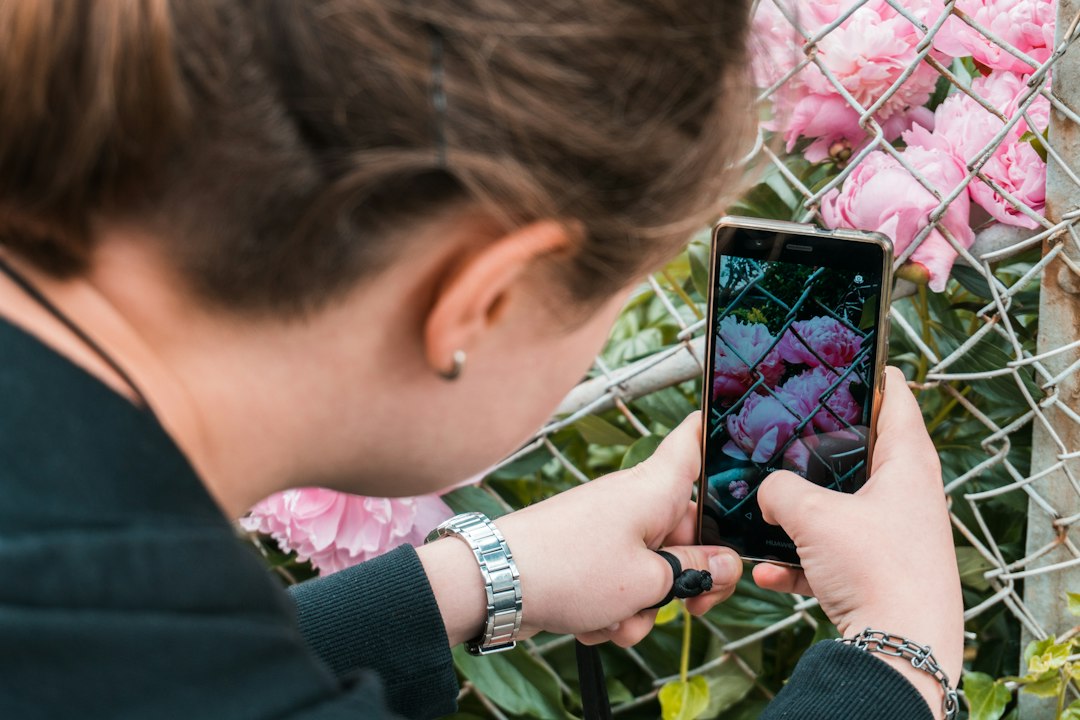
Modern plant identification apps rely on machine learning models trained on millions of photographs tagged by botanists and citizen scientists. When you snap a picture of a leaf, flower, or bark pattern, the algorithm compares visual markers — shape, vein structure, color gradients — against its database.


PlantNet, for example, draws from a dataset built in partnership with research institutions like Cirad and INRAE in France, covering over 20,000 species worldwide. That’s not a gimmick; it’s a crowdsourced scientific tool that also feeds data back into biodiversity research.
Accuracy varies depending on the photo quality and plant part photographed. Flowers tend to give the most reliable matches, followed by leaves, then bark or fruit.
- Flower shots: up to 90% identification accuracy in optimal lighting
- Leaf shots: around 75-85% accuracy, depending on species complexity
- Bark or stem only: often below 60%, since textures overlap across species
What Makes a Photo “Readable” to the App#
Lighting and framing matter more than most users expect. A blurry photo taken in dim indoor light will almost always return a poor match, even on a well-trained app.
Here’s what tends to produce the best results:
- Natural daylight, avoiding harsh midday shadows
- A single leaf or flower filling most of the frame
- A plain background — a table or plain wall works better than cluttered soil
- Multiple angles submitted when the first attempt returns low confidence
From Identification to Daily Care: What These Apps Actually Track#
Identifying a plant is just the entry point. The real value shows up afterward, when the app builds a custom care profile based on species, pot size, indoor or outdoor placement, and even your local climate data pulled from your phone’s GPS.
Apps like Plant Parent go further than generic watering reminders. They factor in seasonal changes, adjusting suggested watering frequency as daylight hours shift and indoor heating or air conditioning alters humidity levels.
| Feature | Basic Plant Apps | Advanced Care Apps |
|---|---|---|
| Species identification | Yes | Yes |
| Watering reminders | Generic schedule | Adjusted by season and climate |
| Disease detection | Rarely included | Photo-based diagnosis |
| Light requirement mapping | Basic text description | Room-by-room light tracking |
| Community features | Limited | Forums, expert Q&A |
Watering Schedules That Adapt to Reality#
One of the most common mistakes new plant owners make is watering on a fixed calendar — every Sunday, no exceptions. Real plants don’t work that way.
A snake plant in a dry apartment during winter heating season needs water far less often than the same plant during a humid summer. Smart care apps recalculate these intervals using temperature and humidity inputs, sometimes synced with local weather APIs.
Diagnosing Problems Before They Become Fatal#
Yellow leaves, brown tips, sudden leaf drop — these symptoms often overlap across completely different problems. Is it root rot? Too much direct sun? A pest infestation? Nutrient deficiency?
Diagnostic features in plant care apps use the same image-recognition technology as identification, but trained specifically on disease and pest patterns. You photograph the affected leaf, and the app cross-references visual symptoms against a library of common issues.
Typical diagnoses include:
- Spider mites: identified by tiny webbing and stippled yellow spots
- Root rot: flagged through described symptoms like mushy stems and foul odor, since this isn’t visible externally
- Nutrient deficiency: recognized by pale or yellowing leaf patterns, especially between veins
- Powdery mildew: detected via the characteristic white, dusty leaf coating
This diagnostic layer turns a plant app into something closer to a pocket botanist than a simple photo-matching tool. ✨
When to Trust the App — and When to Call a Professional#
Digital diagnosis works well for common, visually obvious issues. But severe infestations, unusual tropical species, or plants with sentimental or monetary value sometimes warrant a visit to a local nursery or certified arborist.
Think of the app as a first-opinion tool. It narrows down possibilities quickly, saving you hours of searching forums, but it won’t replace hands-on expertise for complicated cases.

PlantNet Plant Identification
Size256.4MB
PlatformAndroid/iOS
PriceFree
Information about size, installs, and rating may change as the app is updated in the official stores.
Building a Digital Garden Journal#
Beyond identification and troubleshooting, many apps let you build a personal plant collection inside the app — essentially a digital journal tracking growth, repotting dates, fertilizing schedules, and photos over time.
This feature matters more than it sounds. Plants grow slowly, and it’s easy to forget when you last repotted a monstera or fertilized a fiddle-leaf fig. Having a timestamped record removes that mental load entirely.
Some apps also send push notifications that adjust based on your actual interaction history. If you consistently water a plant two days late, the app learns and recalibrates future reminders instead of sending notifications you’ll ignore.
Comparing the Most Popular Options#
Not every app serves the same purpose. Some specialize purely in identification, while others focus heavily on ongoing care management.
- PlantNet: best for accurate, science-backed identification; free and ad-light, supported by research institutions
- Plant Parent: strong on personalized care schedules, reminders, and a clean, approachable interface for beginners
- PictureThis: combines identification with disease diagnosis, though it operates on a subscription model
- Planta: known for detailed light-meter integration using your phone’s camera sensor
Practical Tips for Getting the Most Out of Any Plant App#
Downloading the app is the easy part. Using it consistently is what actually keeps your plants alive long-term.
A few habits make a measurable difference:
- Photograph new plants immediately after purchase, before you forget the species
- Update the app whenever you move a plant to a different room or light condition
- Log watering dates honestly — skipped entries make the schedule less accurate
- Cross-check serious disease diagnoses with a second photo angle before taking drastic action
Treat the app like a living reference, not a one-time tool. The more consistently you feed it information, the more precise its suggestions become.
What This Means for Beginners vs. Experienced Growers#
Beginners benefit most from the identification and basic reminder features — the fundamentals that prevent the most common plant deaths: overwatering and poor light placement.
Experienced growers tend to use the diagnostic tools more heavily, especially for managing larger collections where tracking twenty or thirty plants manually becomes unrealistic. For them, the digital journal feature often matters more than basic watering alerts.
Either way, the technology scales to your needs instead of forcing a one-size-fits-all routine, which is probably why plant care apps have moved from niche tools to mainstream gardening essentials in just a few years. 🌱

Keep reading
You might also like

Best App to Learn Reading for Adults Over 40
Learning to read after 40 feels different — and the right app can make the process practical, encouraging, and genuinely effective. 📚…
Best Apps to Improve 5G Network Performance and Speed
5G promises blazing speeds, but your actual connection often falls short of the hype. The right app can diagnose and fix that…